






Fast, Simple Front Office
Elektraweb Lite
From the room plan to the folio, every core task on one screen.
Elektraweb Lite is a fast, user-friendly front office interface that brings the room plan, drag-and-drop reservations, pricing and folio operations together on one screen.
- Room Plan
- Drag-and-Drop Booking
- Quick Posting
- Payment Link
- e-Invoice
01
Room Plan Features
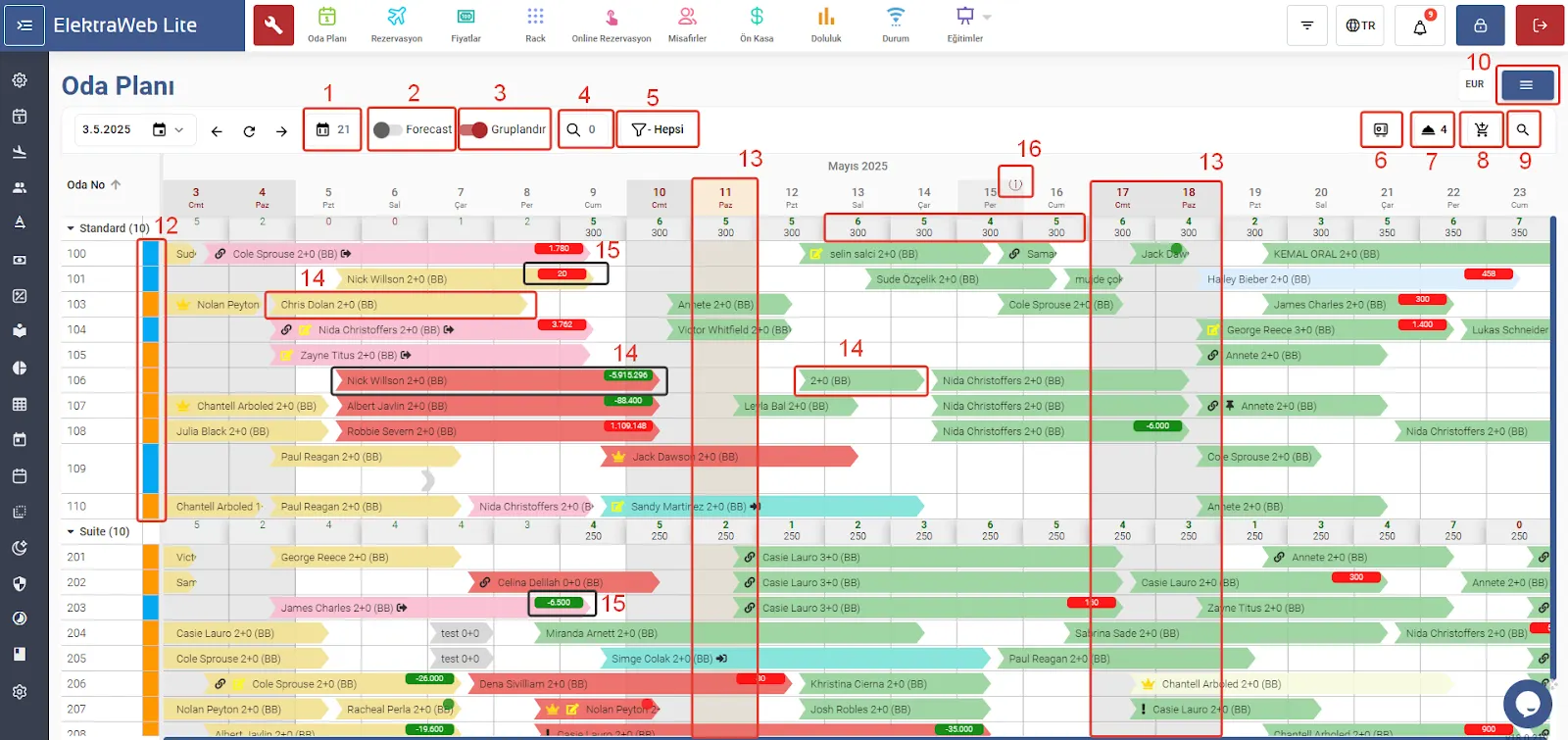
- View the screen for a chosen period; show daily occupied/available rooms or arrivals and departures as a chart with the Forecast button
- Group by room type to see daily rates and availability, and change rates by drag and drop
- List free rooms for a date range, and list by reservation status (expected arrival, expected departure, etc.)
- See the current cash position and amounts received by payment department
- List reservations without a room number and assign rooms
- Add charges to the guest folio or take payment instantly with Quick Posting
- Quick search by name or reservation ID; a shortcut menu for fast access to several actions
- Update room status (clean/dirty/out of order) by double-clicking on the calendar
- Weekends, special days and departed, in-house and reserved bookings shown in different colours
- Folio balance shown in red and green on each reservation; daily management report from the room plan
app.elektraweb.com · Room Plan Features
02
Quick Actions with Right-Click
Right-click a reservation to reach many operations quickly. The colour and icon legend is available from the menu.
app.elektraweb.com · Quick Actions with Right-Click
03
Creating Reservations and Details
- Create reservations by dragging on the calendar; drag to extend or shorten a stay or change room or dates
- Fields filled in automatically from the agency and from the selected room and dates
- One-click check-in or check-out with the plane icon
- Repeat guest check; if there is no record, scan the ID/passport to fill in details quickly
- Enter several guests on one screen; add extra requests, reservation and arrival notes
- Take payment at check-out with card details, or send a payment link to collect remotely
- Send a confirmation form to the guest; print a personalised registration form in the guest’s language
app.elektraweb.com · Creating Reservations and Details
04
Pricing
- Change the automatic daily rate manually and apply discounts
- Calculate the rate in different currencies
- Recalculate daily rates
- Post the full room charge and take payment in one go
app.elektraweb.com · Pricing
05
Folio Operations
- Quick posting from the folio; refunds and other actions from the actions icon
- Split the amount due into as many parts as needed; guest and folio transfers
- Post charges; take payment in any currency and payment type
- Issue an invoice and send an e-invoice once the folio is settled
- Print the folio and the carbon certificate
app.elektraweb.com · Folio Operations
Other Solutions · Other solutions
- Elektraweb MİNİFor Small Hotels, Channel Manager Included
- System IntegrationsIntegrated with Third-Party Systems
- TGA IntegrationCentral Database of Accommodation Facilities
 Conference TranslatorLive conference translation
- Smart SustainabilityThe Future of Sustainable Tourism with AI
 MCPAI Integration
 Kurumsal SICorporate AI Assistant
 Elektra ManagerManagement Mobile App
 Elektra OperatorMobile App for Hotel Staff
- IntegrationsSystems We Connect To
- Marina ManagementELEKTRAWEB Marina Management System
- Cloud ServerMicrosoft Azure Cloud Infrastructure
- Premium ServerTop Speed and Service
- Google BackupHigh Performance with BigQuery
- Hotel Sales PortalCentral Reservation Portal
- Supply PortalWork Easier and Save
- ViofunAn Open Ticket to the World of Entertainment
- Park AutomationPark / Club / Beach Automation System
- Dormitory ManagementOpex Dormitory Management Software
- Fair and Congress RegistrationProfessional, Efficient and Economical
- Module StoreElektraweb Market Place
Free Demo
Grow your hotel’s profitability with Elektraweb.
The most comprehensive web-based, cloud hotel management system. 24/7 online support from a team of 160. Let us call you and plan the right solution for your needs together.