



Contract Generation by Rate Code
Hotel Contract Wizard logo

Hotel Contract Wizard

Generate your contract automatically from definitions and transfer it to Elektraweb in one click.

The Hotel Contract Wizard generates your hotel contract automatically per rate code from season, room, sales period and occupancy type definitions. AI reads the tour operator contract PDF and imports periods, room types and coefficients into the wizard; per-person rates are calculated from a coefficient template. It opens from Elektraweb in one click, and the finished contract is transferred to Elektraweb after a pre-check and preview.

  • AI reads the contract PDF, imports it into the wizard and matches it to the PDF
  • Step by step: periods, markets and sales periods → room types → multiplier template → generated contract
  • Per-person (PPD) pricing: (PPD + first difference) × coefficient + final difference, child age group coefficients
  • Mapping to Elektraweb room types (HOTEL_ROOMTYPE), occupancy combinations by capacity
  • Transfer to Elektraweb after pre-check and preview; launch from Elektraweb with your session already signed in
  • Sales
  • Integration
  • Savings
01

Open It From ElektraWeb in One Click

Open the Contracts and Rate Codes screen under Rate Definitions in the Contract Management menu; the wizard button on the toolbar starts the Contract Wizard.

  • Contract Management › Rate Definitions › Contracts and Rate Codes
  • Wizard button on the toolbar
  • The session is passed over from ElektraWeb automatically
app.elektraweb.com · Open It From ElektraWeb in One Click
02

Upload the Agency Contract

Open the wizard with “New contract” and upload the PDF or Excel contract from the agency with “Add contract from PDF”.

  • PDF and Excel (.xlsx, .xls, .csv) support
  • The contract is created for the hotel you are working in
  • The file is used for reading only
app.elektraweb.com · Upload the Agency Contract
03

AI Analyses the Contract Automatically

The AI detects periods, room types, board and rate types, occupancy combinations, coefficients and important special terms.

  • Rate code and contract details
  • Validity dates and periods
  • Combinations, coefficients and special terms
app.elektraweb.com · AI Analyses the Contract Automatically
04

Smart Matching With Your ElektraWeb Definitions

The room, board and rate types read from the contract are matched with your hotel’s ElektraWeb lists and presented for approval. The moment you click “Apply matching”, the contract is created.

  • Definitions with the same name are selected automatically
  • Missing ones are picked from the list in one click
  • Every step is filled with the contract’s data
app.elektraweb.com · Smart Matching With Your ElektraWeb Definitions
05

The Contract Is Created

After matching, the contract is ready with prices calculated per room and period. Check it and edit base or cell prices if needed.

  • Base price in the room headers
  • Combination prices in the period columns
  • CSV · Excel · Print / PDF
app.elektraweb.com · The Contract Is Created
06

Special Terms: Important Clauses Colour-Coded

Important clauses detected by the AI are listed under Special Terms: those in the hotel’s favour in green, those that may be against the hotel in red. Each clause comes with its article and page reference in the contract.

  • In the hotel’s favour · Against the hotel · Neutral
  • Contract reference (article · page)
  • Clauses derived by interpretation are marked “Interpretation · verify”
app.elektraweb.com · Special Terms: Important Clauses Colour-Coded
07

Save and Transfer to ElektraWeb

After the final checks, save the contract; with “Transfer to Elektraweb” the prices are written to the selected rate code as contract details and a child price matrix.

  • Pre-check and preview before transfer
  • Every transfer is versioned
  • Missing definitions are listed line by line
app.elektraweb.com · Save and Transfer to ElektraWeb
08

Manual · Step 1: Rate Code, Sales Range and Periods

If you prefer to define a contract without a PDF, the wizard guides you in four steps. Open it with “New contract”, choose the rate code from the ElektraWeb list, add the sales range and define each period with “Add period”.

  • Rate code (from ElektraWeb) and sales start / end
  • Period code, board type, rate type, start and end
  • Pricing basis, PPD base price and release (days)
  • Add markets for separate prices and currencies if needed
app.elektraweb.com · Manual · Step 1: Rate Code, Sales Range and Periods
09

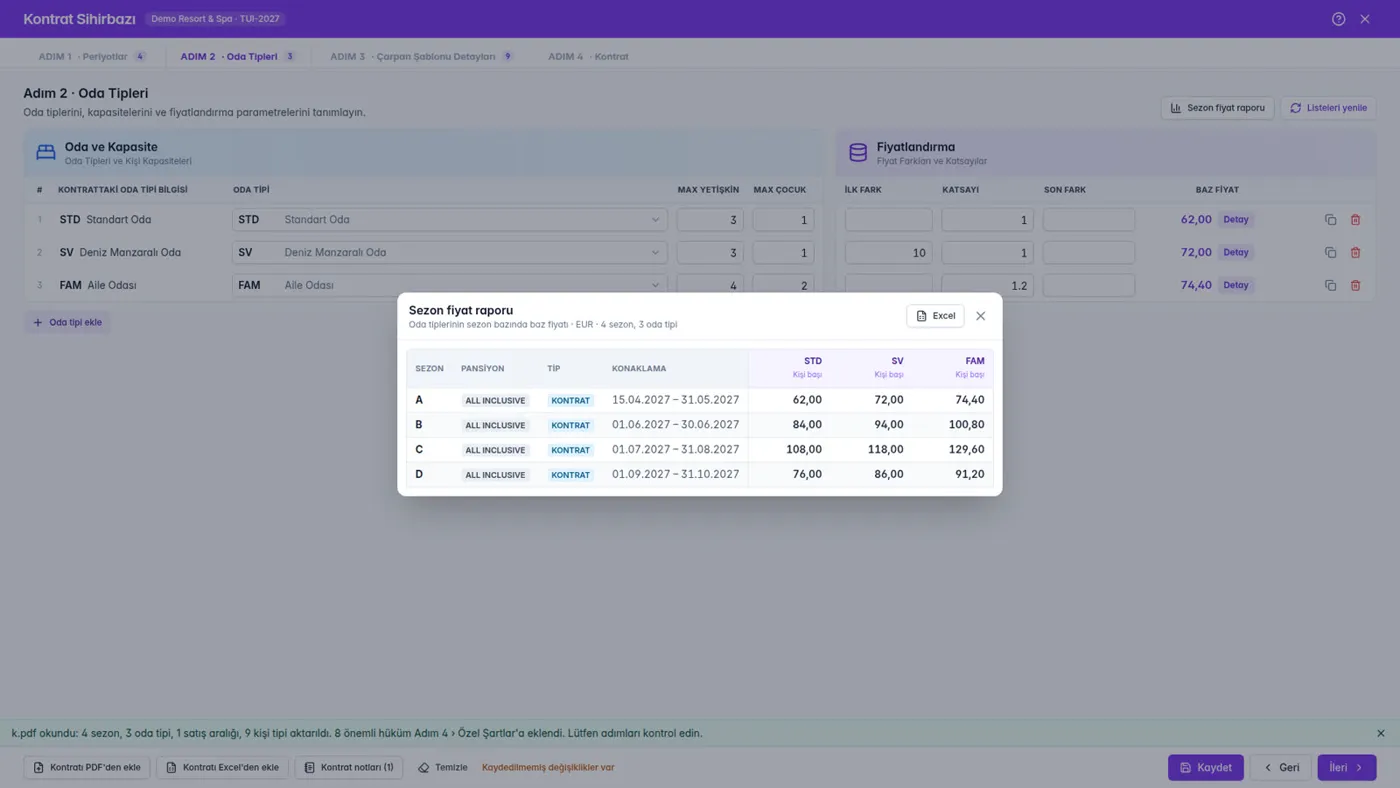
Manual · Step 2: Room Types, Capacities and Price Relation

The hotel’s ElektraWeb room types are listed. Define each room’s capacity and its price relation to the PPD; the base price is calculated instantly for every period.

  • Room type (from the ElektraWeb list)
  • Max adults and max children
  • First difference · coefficient · last difference → base price
  • Check the whole season with the Season Price Report
app.elektraweb.com · Manual · Step 2: Room Types, Capacities and Price Relation
10

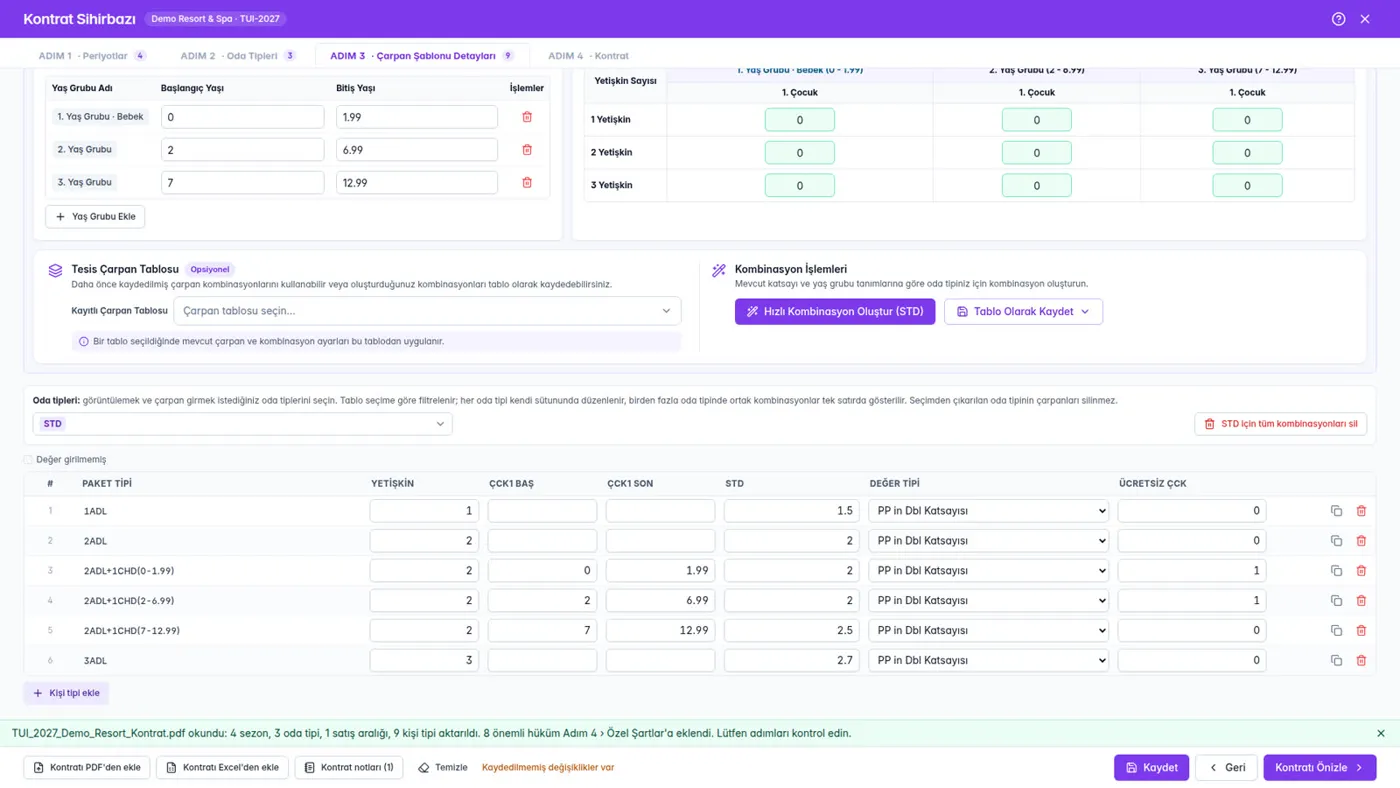
Manual · Step 3: Combinations and Coefficients

Choose the room type, enter child age groups and the basic room coefficients, enter the child coefficient for paying age groups and generate every combination with “Quick Combination”. If you have a saved multiplier table, just select it.

  • Child age groups (from / to age)
  • Single · Double · Triple coefficients and child coefficients
  • Quick Combination · edit one by one
  • Save as Table or pick a saved table
app.elektraweb.com · Manual · Step 3: Combinations and Coefficients
11

Manual · Step 4: Check, Save, Transfer

Everything you defined appears in the contract: periods in columns, room types in headers, combinations with calculated prices. Add special terms, save and transfer to ElektraWeb.

  • Filters and editable prices
  • Special Terms (Special / Accounting Notes)
  • Save · Transfer to Elektraweb
12

What Changes for Your Hotel?

AI-powered contract reading, smart data matching, automatic pricing and reusable definitions; all your contract processes on one platform.

  • Time saved: contract entry drops from hours to minutes; the same definitions aren’t rebuilt for every contract
  • Fewer errors: data is read from the contract, matched with ElektraWeb definitions and checked before transfer
  • Standard pricing: saved multiplier tables keep a consistent price structure across contracts
  • Informed decisions: clauses that need attention are in front of you with their article reference

Screens

Explore the Contract Wizard screens

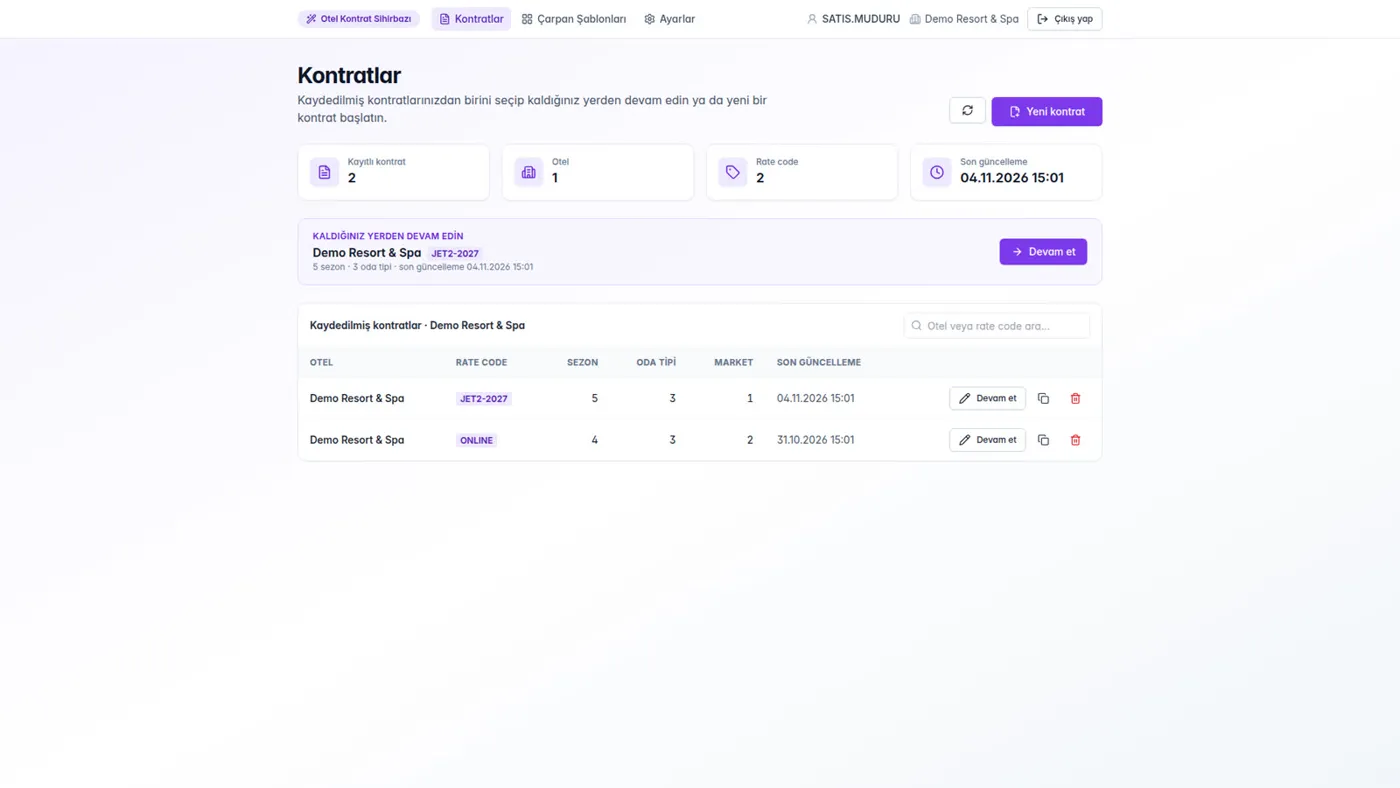
app.elektraweb.com · Contracts and Rate Codes
Contracts and Rate CodesSeason Price ReportCombinations

01 / 03

Contracts and Rate Codes

  • All of your hotel’s contracts on one screen; a new contract starts with the wizard.

Watch

Videos

Report to Us