





Online Booking
Commission-free direct bookings with a best price guarantee.
This AI-powered booking engine delivers a direct sales experience that lets your guests compare room types, board options and refundable rates with real-time pricing. It is fully integrated with Elektraweb PMS: bookings land in the PMS instantly and payment is taken online.
- Commission-free direct bookings with real-time rates and availability
- Side-by-side comparison of room types, board and cancellation terms
- Best price guarantee and promo code support
- Online payment, instant confirmation and automatic transfer to Elektraweb PMS
- Mobile-friendly, multilingual and multi-currency booking flow
- Sales
- Integration
The Booking Page Your Guests See
On the hotel's official booking page, guests see the best price, special offers and instant confirmation. There is no intermediary commission; payment goes straight to the hotel.
- Hotel introduction, stars, address, phone, email and map
- Gallery and facilities: the hotel's photos and every facility on the page
- Reviews and scores from Google, Booking and other platforms
- ‘Book now, pay later’ and instalment options
- Multi-language and multi-currency page
- Only in Elektraweb: The booking page takes its information from the hotel's Elektraweb PMS record; no separate content entry needed.
Search and Two Rate Types
Guests pick dates and the number of adults and children (with the child's age), press Search, and available rooms and prices appear.
- For every board type a Refundable and a Non-refundable rate; the non-refundable option can be 15% cheaper
- Last cancellation date and terms under ‘Details’, daily prices under ‘Daily prices’
- Total with VAT and per-bank instalment options
- Several rooms and stays in one basket
- Only in Elektraweb: Availability, prices and rules come live from Elektraweb PMS; the room you see on the page is the room you can sell at the front desk.
Availability Calendar
A guest who clicks ‘Availability’ sees, from the chosen date for 15 days, the remaining rooms and nightly price of every room type in one table.
- Remaining rooms and nightly price for each day
- Closed or sold-out days are marked
- Search by clicking dates in the table or dragging on a room row
- ‘Open the calendar on load’ in Settings opens the page with the calendar
- Only in Elektraweb: Room counts in the calendar equal your PMS inventory, so there is no overselling risk.
Promo Code, Membership and Bonus
A guest enters a promo code and prices come discounted; members earn bonus points and use them on later stays.
- Promo code: a PROMO badge and the struck-through old price show the discount
- Welcome bonus for members and bonus points on every reservation
- Secure sign-up with an email verification code
- Spend the bonus at payment
- Member-only discounts and prices
- Only in Elektraweb: Membership, bonus and promotions live on the same guest card as your Elektraweb loyalty and CRM records; every guest who has stayed is already registered.
Basket, Extra Services and Payment
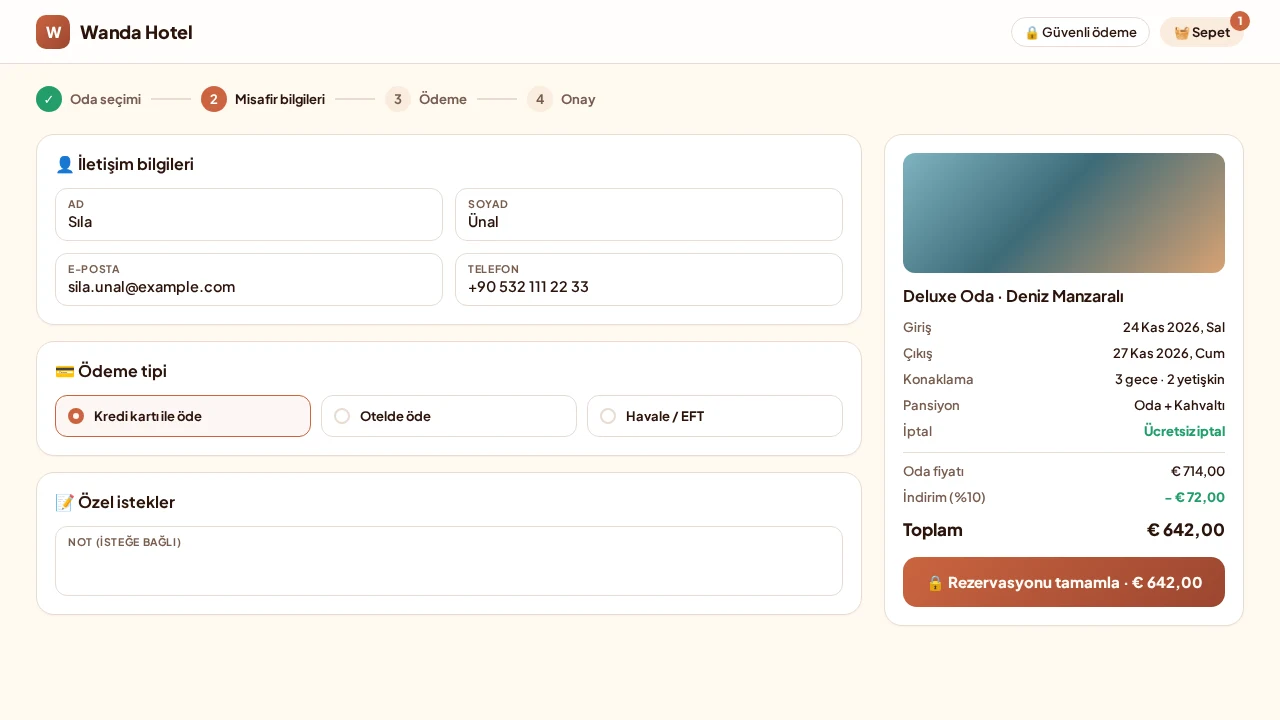
The basket lists extra services next to the room, line by line: transfer, hammam and massage, aromatherapy. All are sold in one reservation and added to the total.
- Guest details: a member's contact details come pre-filled
- ‘Pay now’ by card (virtual POS) or ‘pay later’
- Agreement approval and reservation terms
- Confirmation screen: reservation number, room and price
- Visibility through the free Google and trivago integrations
- Only in Elektraweb: The moment the reservation is confirmed it lands in the Elektraweb front office and the confirmation goes to the guest.
Guest Account: Online Actions
A member guest sees active reservations in their own account and handles stay-related actions online.
- Active and past reservations
- Online check-in and check-out
- Restaurant booking, room upgrade and extra service purchase
- Folio and payment actions, receiving the e-invoice
- A signed-in guest can search for their next holiday
- Only in Elektraweb: Check-in, restaurant, upgrade and folio actions work directly on the PMS record.
Call Center: Sell to the Guest on the Phone From the Same Screen
Staff sign in with a user code and password. The switchboard drops the call onto the screen; the caller's number finds the guest card automatically.
- Card: VIP, membership level, which stay it is and bonus balance
- If not registered: create a guest card and open a loyalty card (with SMS verification)
- Room and price search, manual discount (e.g. Call center 10%) and extra basket discount
- Several rooms and stays, spend the bonus with an SMS code
- Basket type: reservation, optional offer or pending reservation; card, pay at hotel or payment link
- Call classification, call cancellation with reason and note
- Only in Elektraweb: The call center manages the reservation and guest card directly in Elektraweb PMS; no separate call-center software or data transfer.
Call List, Kanban and Analytics
All calls are listed with status, source, staff, stay, amount, payment, option and callback time.
- Source, operator and status filters; totals filter instantly
- Kanban: one column per status, drag cards to move them
- Analytics: calls by status, operator success rate, sources and cancellation reasons
- Reminders when a callback is due; resend the payment link by email
- WhatsApp conversation inside the record
- Only in Elektraweb: Sales results and payments match PMS reservations, so performance is measured on real data.
Agency Sign-in and Invoices
An agency signs in with its own user and sees only its own records.
- Customer invoice from paid reservations (bulk issue as individual)
- Commission invoice: the commission the agency invoices the hotel
- Invoices screen with type, date range and search filters
- Only in Elektraweb: Agency reservations and commissions work with the agency definitions in Elektraweb.
Settings: Shape the Page to Your Brand
The hotel manager reaches every setting from a menu of 5 headings; search (Ctrl K) finds any setting by name.
- Look and brand: logo, favicon, main image, opening promotion pop-up, custom CSS and theme colour
- Footer: tourism licence number, agreement links and card logos
- Price and calendar display, rate codes and how many rates are shown
- Membership intro: title, benefits, image or your own HTML
- Per-language texts, ‘Preview page’, Save and Discard
- Only in Elektraweb: Changes show on the page as soon as you press Save; no technical team needed.
Screens
Explore the Online Booking screens
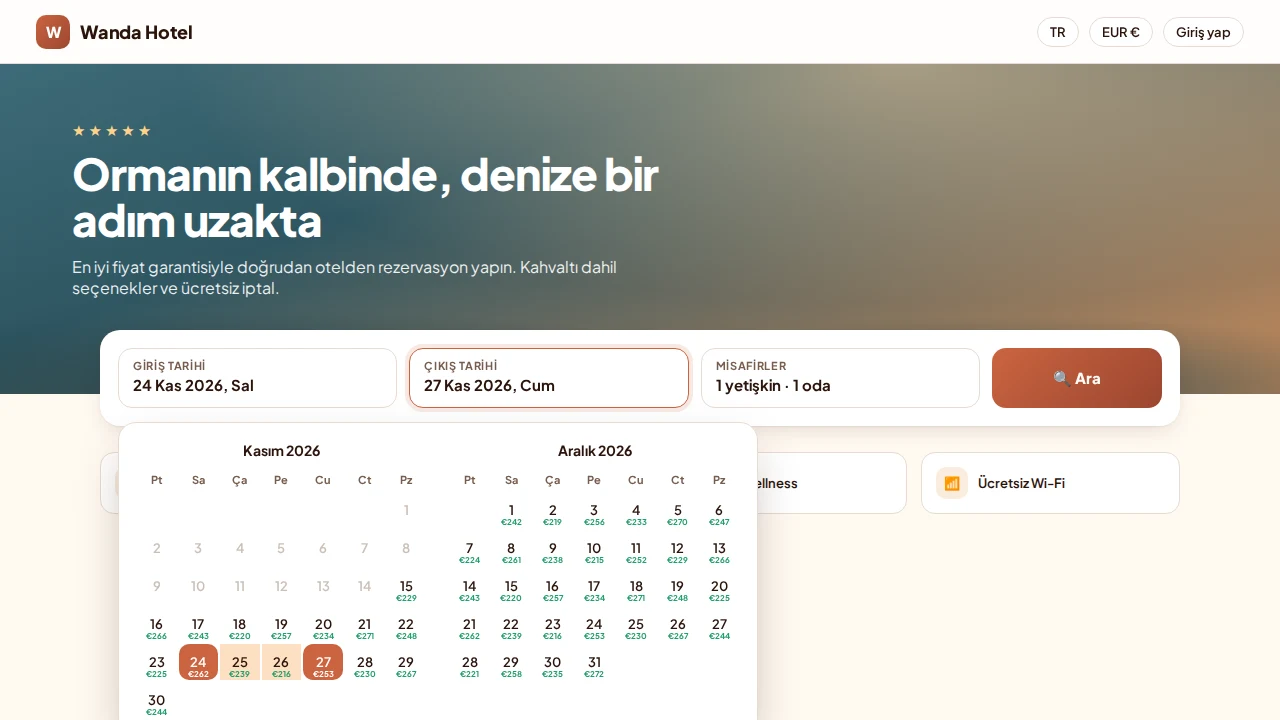
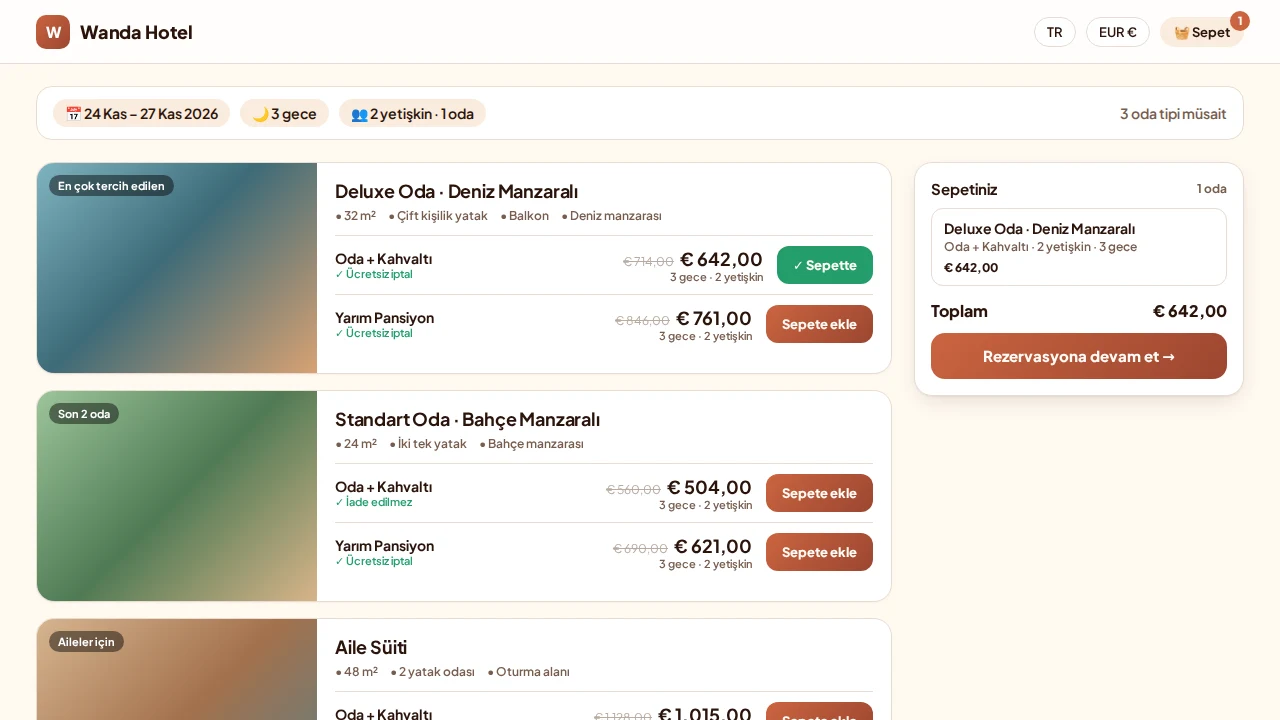
01 / 03
Dates and Guests
- The guest picks check-in and check-out dates on the calendar; each day shows its price.
- Adults, children and rooms are set in the same search bar; one click searches availability.
Online Booking
Training Video: Online Booking Page
A step-by-step walkthrough of the online booking page, from the guest’s room search, rate and board choice through the basket and payment to the confirmed booking. (Narrated in Turkish.)
Hotel · Other solutions
- PMSWeb-Based, Cloud-Hosted PMS
- Channel ManagerBuilt-in Channel Manager
- Sales and BanquetsSales and Banquet Management
 Agency BonusTravel Agency Loyalty Programme
- Call CenterElektraweb Call Center Solutions
 Kiosk Check-inSmart Check-in
 Tour OperatorAcenta Online Connector
 Smart Dynamic PricingRevenue Management with Elektra AI
- Loyalty and CRMElektraweb Loyalty and CRM Management
 Reputation ManagementOnline Reputation & Review Management
 Rate ManagerRate Management · Competitor Analysis
 Contract WizardContract Generation by Rate Code
 Social MediaAI Social Media Manager
 Web Site DesignerA Website Built for Your Hotel with AI
 Guest MobileElektraMobil · Guest App
 Smart WhatsAppAI Hotel Assistant
- Hotspot and LoggingLogging Compliant with Law No. 5651
- Timeshare ManagementTimeshare and Holiday Ownership Software
 Carbon OffsettingGreen Hotel · Carbon Certificate
Free Demo
Grow your hotel’s profitability with Elektraweb.
The most comprehensive web-based, cloud hotel management system. 24/7 online support from a team of 160. Let us call you and plan the right solution for your needs together.