







ResCheck
ResCheck pulls in all your reservations and brings them together on one screen.
ResCheck automatically collects the reservations that agencies and tour operators send through their websites and by email. It checks them against your Elektraweb records and puts them up for your approval. It opens from inside Elektraweb, and an approved reservation is saved straight into the PMS.
- Reservations pulled automatically from 65+ operators and agencies via extranet, API and email
- Reservation emails from your mailbox in ResCheck; replies from here, automatic if you like
- One-click mapping on the reservation card; matching names map themselves
- One click to confirm to the agency and save to the Elektraweb PMS
- Flight times, guaranteed allotment, stop sale, dashboard and reports
Screens
Explore the ResCheck screens
01 / 05
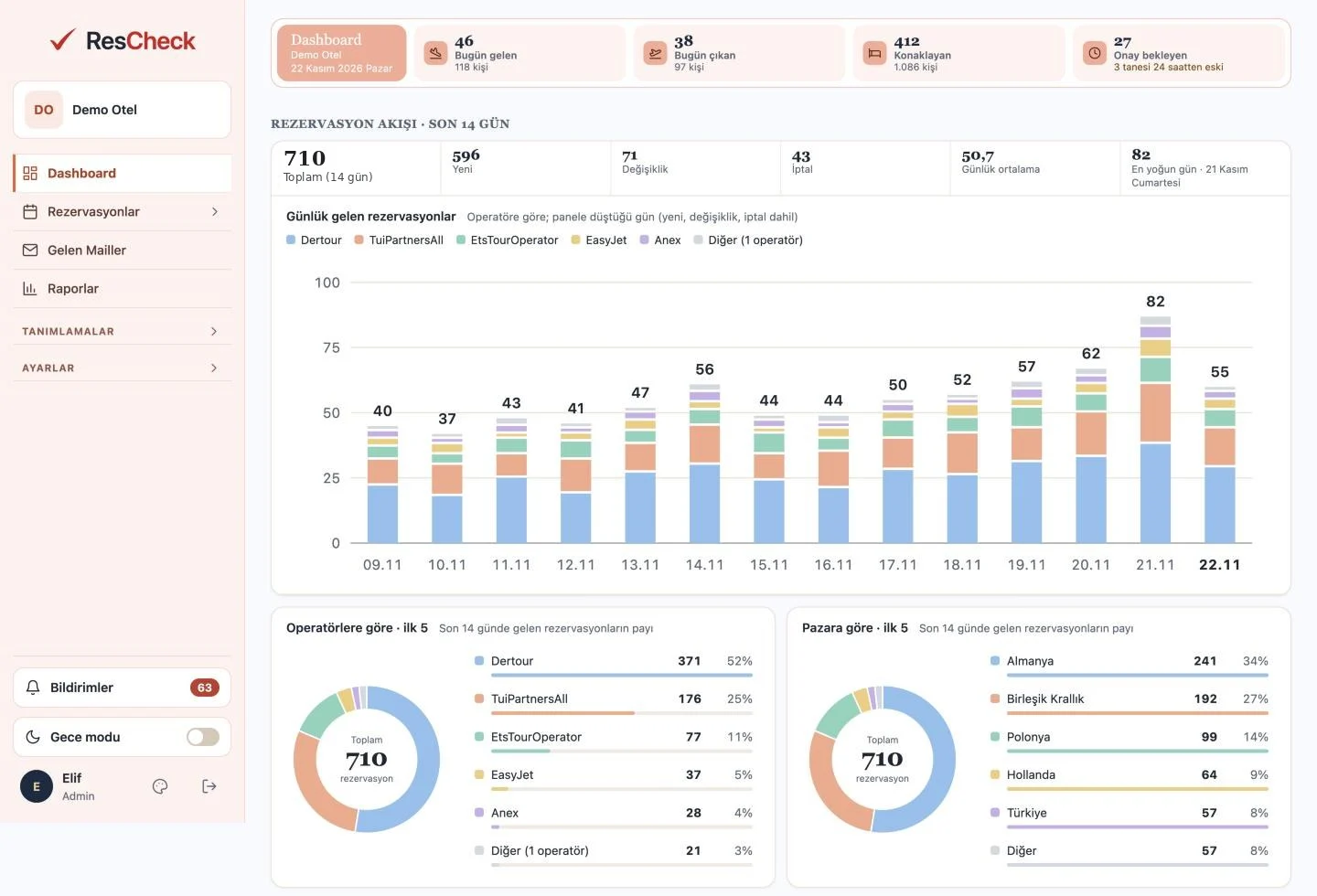
ResCheck · Dashboard
Automatic Retrieval
We pull the reservations from tour operators for you.
Every operator with an extranet or API connection on one screen. ResCheck scans each channel at regular intervals and brings new bookings, amendments and cancellations to the panel by itself.
The ResCheck difference: No more visiting extranets one by one for reservations: they are all in ResCheck, all automatic.
- Operator login details are entered once; scanning runs without interruption
- New bookings, amendments and cancellations are captured separately
- The last scan time of every channel is visible at a glance
Mail Management
The reservations in your mailbox are in ResCheck too.
All the reservation emails agencies send to your hotel land on the ResCheck screen, so you no longer need to open your mailbox separately. The message body and attachments are read and those that are reservations are turned into records. You reply to the agency by email directly from ResCheck.
The ResCheck difference: No switching between mailbox and panel: reading, checking and replying on the same screen, with fully automatic replies if you wish.
- Check all reservation emails in your mailbox from ResCheck
- Send your reply to the agency by email through ResCheck
- Replies can go out automatically, so there is no need to write emails by hand
Easy Mapping
Map with one click and let the rest map themselves.
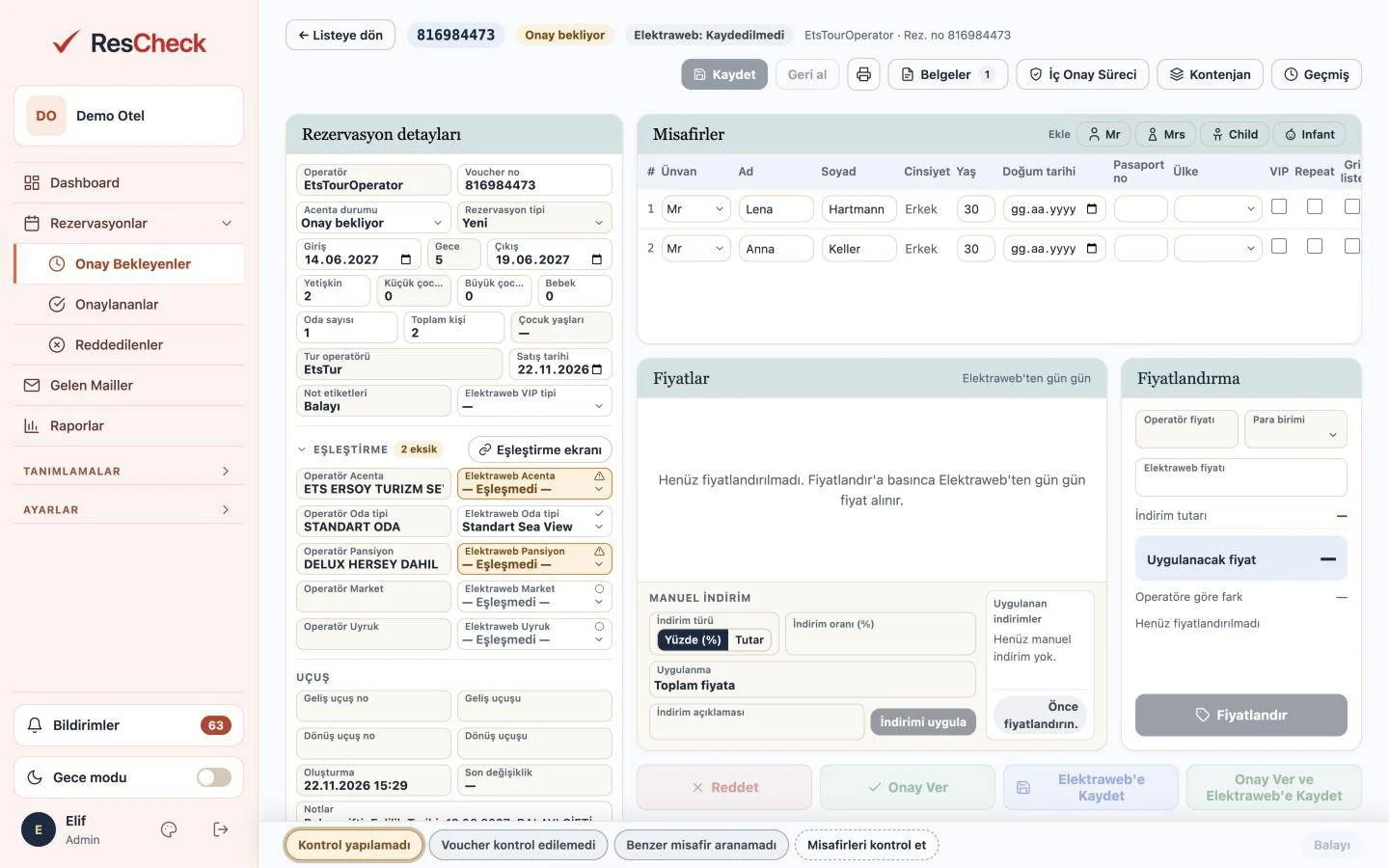
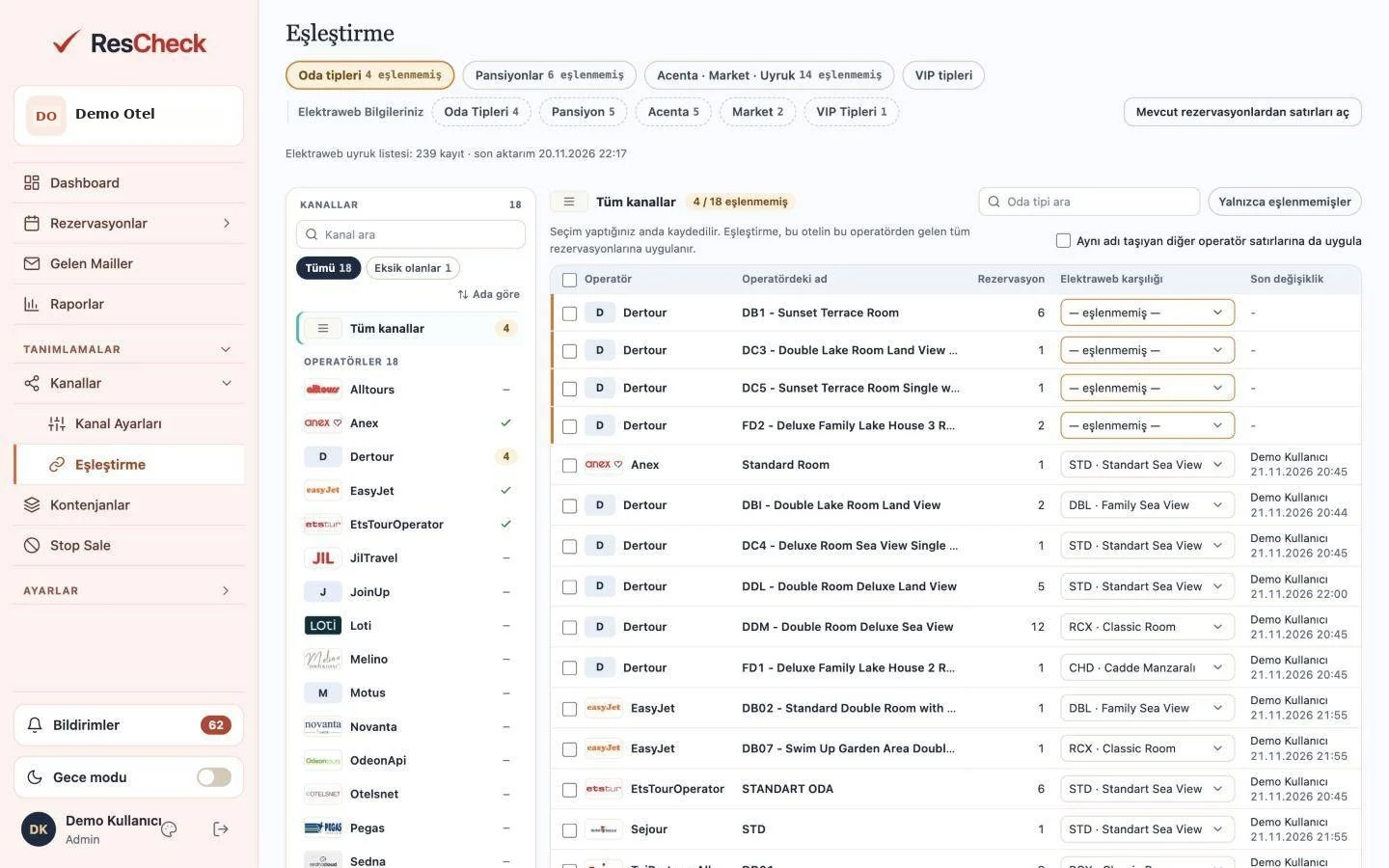
When a new room type, board or agency name arrives, you simply pick its Elektraweb counterpart from inside the reservation card and click “Save mapping”. All reservations arriving with the same name map themselves, with no long sessions over mapping lists.
The ResCheck difference: A mapping you save once applies to every reservation that arrives with that name; you never do the same job twice.
- Mapping from inside the reservation card, with one click
- All reservations with the same name are mapped automatically
- Works for room type, board, agency, market and nationality
Guaranteed Allotment
Reservations within the guaranteed allotment queue up by themselves.
Define the operator’s guaranteed allotment, and a reservation that meets the conditions is queued for the PMS automatically. If you want to keep accepting even on stopped dates, just turn on “Ignore stop sale”.
The ResCheck difference: Guaranteed allotment reservations are processed without anyone waiting; you set the stop policy for each allotment.
- Reservations that meet the conditions go to the PMS queue automatically
- Accept on stopped dates too with “Ignore stop sale”
- Full control per allotment
Stop Sale
Set your stop sales and send them to agencies with one click.
You can set stop sale dates on the ResCheck screen and send these dates to agencies by email. The stop sale dates you enter in Elektraweb are pulled into ResCheck with one click.
The ResCheck difference: Stop sale information is managed in one place; notifying agencies and syncing with Elektraweb happen on the same screen.
- Set stop dates in ResCheck
- Send the dates you set to agencies by email
- Pull the stops in Elektraweb with one click
Flight Information
Flight times are written to check-in and check-out by themselves.
All flight times sent by agencies are captured and written into the reservation saved in Elektraweb as check-in and check-out times. If you like, enter how far your hotel is from each airport: this time is added to the check-in time, subtracted from the check-out time, and the information is passed all the way to the front office.
The ResCheck difference: The front office sees the guest’s arrival and departure times ready in the reservation.
- All flight times sent by agencies are captured
- Written to the reservation as check-in and check-out times
- Airport distance is added to check-in and subtracted from check-out
Uninterrupted Connection
Password changes are planned, the reservation flow never stops.
The extranet password change intervals of the agencies are defined in the system. You get a reminder 3–4 days before the change date and update the password in the extranet and ResCheck at the same time. If a change is forgotten, you are told right away why reservations are not coming in.
The ResCheck difference: Because we put the channel on hold in a controlled way after failed logins, you do not get banned from operator sites.
- Reminder 3–4 days before a password change
- Instant notification for a forgotten change
- After failed logins the retry interval grows, and as a last step the channel is paused
Dashboard
All reservation traffic at a glance.
On the dashboard you see today’s arriving, departing and in-house guests, reservations waiting for approval and the last 14 days of reservation flow by operator. The breakdown by operator and market is on one screen.
The ResCheck difference: No need to run a report to see how the day stands; it is ready the moment you open it.
- Today’s arrivals, departures, in-house guests and pending approvals
- 14-day reservation flow by operator
- Share by operator and market
Reports
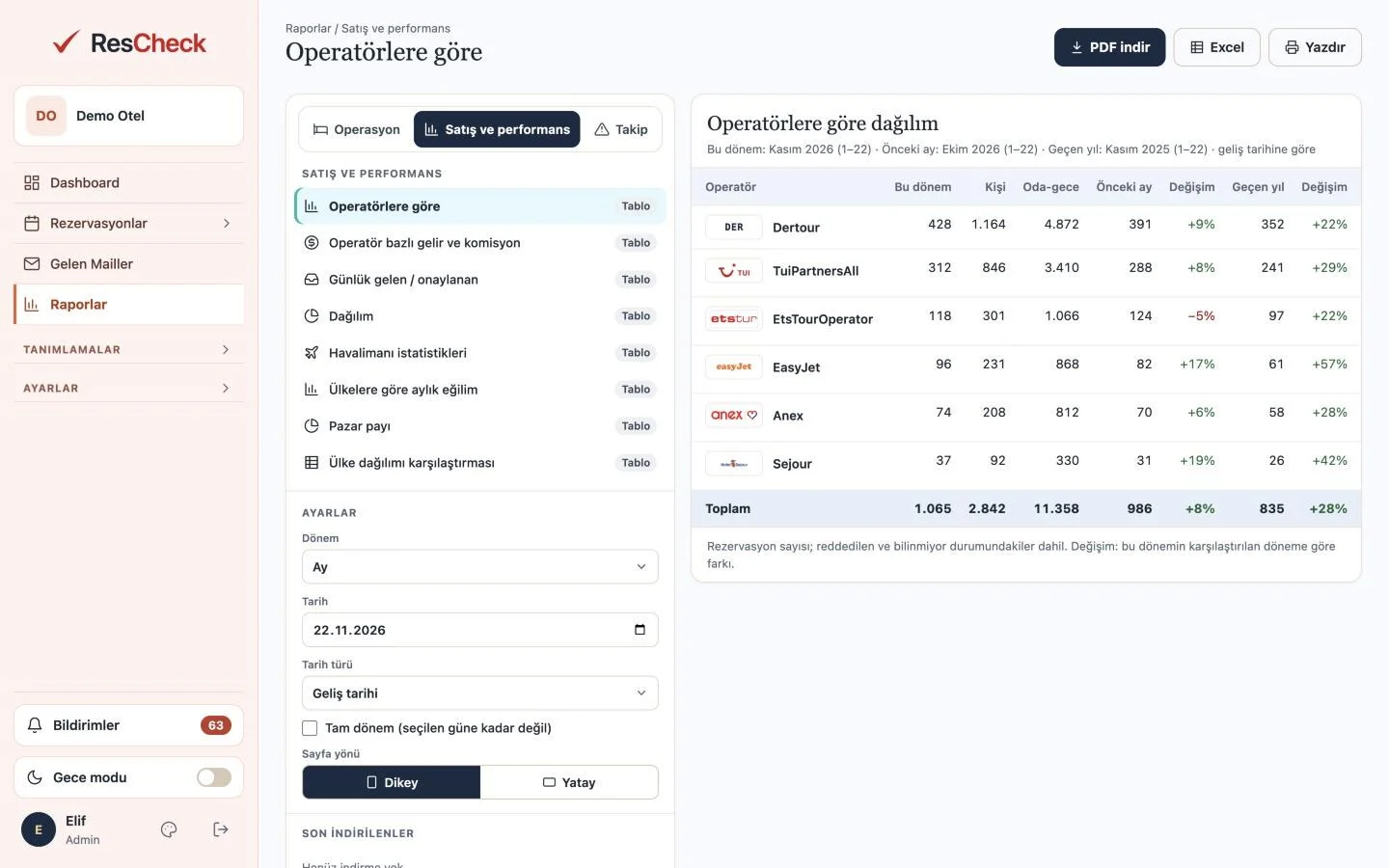
Operations and sales reports in one click.
You get arrival, departure, in-house and flight lists as PDF, Excel or printout. On the sales side, reports on distribution by operator, revenue and commission, market share and trends by country are ready. The flight list report shows how many passengers from each market arrived at the airport you choose and how many of them came to your hotel; you see in figures which markets you are strong in and where you are missing share.
The ResCheck difference: You make sales and marketing decisions with data on the passengers who actually arrive at the airport.
- Arrival, departure, in-house and flight lists as PDF / Excel
- Operator, market, revenue and commission reports
- Passengers arriving at the airport from each market, and how many of them came to your hotel
Logs
Every action leaves a trace.
Every step from receiving a reservation from the agency to saving it in the PMS is logged. You see who did what and when, filtering by user, agency and system source.
The ResCheck difference: Instead of asking what happened to a reservation, you see it in the log.
- The full history of a reservation, step by step
- User, agency and system actions shown separately
- Search by voucher and date range
One-Click Approval
The rest is one click: approve and save.
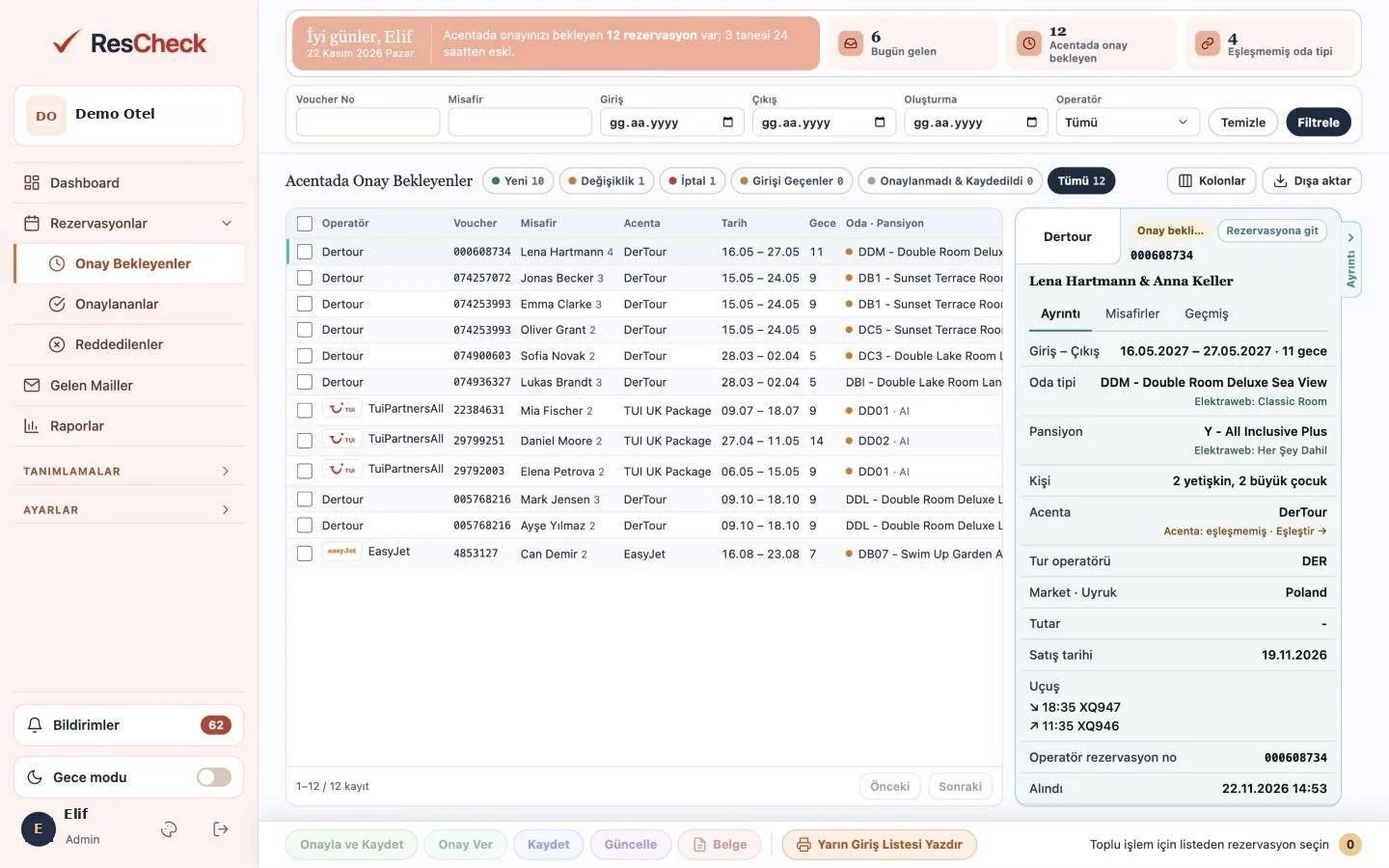
Pulled and checked reservations wait for you in the approval list. When you click “Approve and Save”, the agency gets its confirmation and the reservation is saved in the Elektraweb PMS.
The ResCheck difference: Agency confirmation and PMS record in one step; you never process the same reservation separately in two systems.
- New bookings, amendments and cancellations in separate tabs
- Pending items older than 24 hours are highlighted
- Approved and rejected reservations in their own lists
Mobile App
ResCheck in your pocket
A notification arrives, you open the reservation, the checks are done; with one tap you approve it and save it to Elektraweb. Everything you do on the web you can also do on mobile.
- Instant notifications: Your phone is notified of new, amended and cancelled reservations and of those waiting for approval.
- Approve and save: Review the reservation on mobile, approve it with one tap and save it to Elektraweb.
- Checks: See the results of voucher, similar guest and mapping checks instantly.
- Mapping: Map unmatched room type, board and agency names from your phone.
- Channel and password alerts: Alerts about operator connections or password expiry land in your pocket.
- Dashboard and reports: The day’s summary, reservation flow and reports are always with you.
Integrated with 65+ tour operators and agencies
With extranet, API and email integrations, reservations are transferred to Elektraweb automatically. Any new agency you need is on your screen in 1 day: if the operator you work with is not on the list, tell us and we will build the integration.




















- Melino
- Motus
- Mail Reservations
- Adonis
- Akay
- Akgünler
- Aress
- Atik

- Bed with Ease
- Bek Kongre Turizm

- Bluebird

- Brontes
- CIP Travel
- Consul Travel

- DFS

- DTS Türkiye
- Elis

- İntra
- İrels


- Karnak Travel
- Kartaca
- Kaya Reisen

- MTS Tur (Kıbrıs ETS)
- Peninsula
- Royalstar
- Rustar
- Sara Tour

- Sunquest


- Yuppi Travel
Our reference properties
Some of the properties that manage their tour operator reservations from a single screen with ResCheck.


- Alaiye Kleopatra Hotel
- Alaiye Resort & Spa Hotel



- Dizalya Palm Garden Hotel

- Grand İdeal


- İdeal Pearl
- İmeros Otel


- Le Jardin Resort HV


- Orka Sunlife


- Ölüdeniz Beach Resort By Z Hotels
- Panorama Hotel
- Piccolo Hotel

- Pine Valley
- Queen's Park Göynük
- Ramada Side Otel


- Sahra Su Holiday Village & Spa



- St. Nicholas Park Hotel






- Yasmin Hotel
ResCheck
Get to know ResCheck in 4 minutes
All information on the screens is sample data.
Hotel · Other solutions
- PMSWeb-Based, Cloud-Hosted PMS
 Online BookingDirect Sales
- Channel ManagerBuilt-in Channel Manager
- Sales and BanquetsSales and Banquet Management
 Agency BonusTravel Agency Loyalty Programme
- Call CenterElektraweb Call Center Solutions
 Kiosk Check-inSmart Check-in
 Tour OperatorAcenta Online Connector
 Smart Dynamic PricingRevenue Management with Elektra AI
- Loyalty and CRMElektraweb Loyalty and CRM Management
 Reputation ManagementOnline Reputation & Review Management
 Rate ManagerRate Management · Competitor Analysis
 Contract WizardContract Generation by Rate Code
 Guest MobileElektraMobil · Guest App
 Smart WhatsAppAI Hotel Assistant
- Timeshare ManagementTimeshare and Holiday Ownership Software
 Carbon OffsettingGreen Hotel · Carbon Certificate
Free Demo
Grow your hotel’s profitability with Elektraweb.
The most comprehensive web-based, cloud hotel management system. 24/7 online support from a team of 160. Let us call you and plan the right solution for your needs together.